Your Goodreads author page: claim it, set it up, use it well.
Goodreads is the book site where readers keep shelves of what they have read and want to read. Your book may well be listed there already, with an author page nobody has claimed. This guide shows how to claim it, what the tools do, how to handle reviews by Goodreads' rules, and how much time a business book deserves there.
About the sources. Every Goodreads feature and rule below was read on Goodreads' own pages on October 21, 2026, and is linked. Goodreads changes its tools, so check the linked page first.
Does Goodreads matter for a nonfiction book?
It depends on the book's job. Every nonfiction book has one: win clients, earn speaking invitations, or reach readers (Lesson 1 explains how to name it). Goodreads is built for people who browse for their next book: good for a memoir, self-help or broad business book, far less so for a book written for forty procurement directors.
For every book, though, the page exists whether you claim it or not, and until you claim it you cannot add your photo or bio or fix your book listings. Claiming is free and setup takes about half an hour. The real question is how much time to give it afterward.
| The book's job | Setup (30 minutes) | Ongoing time | Giveaway? |
|---|---|---|---|
| Reach readers (memoir, self-help, broad business) | Yes | A little each month: shelving books, answering questions | Worth testing before launch |
| Speaking invitations | Yes | Answer reader questions when they arrive | Optional, small |
| Clients in a narrow industry | Yes | Check in after launch and once a quarter | Usually skip; mail copies to named prospects instead |
Claim the page for every book. Give Goodreads ongoing hours only if your reader is the kind of person who keeps a reading list. If your reader is a short list of decision-makers, set it up, keep it accurate and put the hours into getting the book into named hands.
How to claim your author profile
Goodreads calls this joining the Author Program. Its program page says any author, anywhere in the world, can join for free, and that you need a published or soon-to-be published book in Goodreads' database. The steps it gives, on the desktop site:
Sign in or create a Goodreads account
Use the account you want readers to see. If you already use Goodreads as a reader, use that account; your login and password stay the same after approval.
Find your book
Search for your most popular book by ISBN, ASIN (Amazon's product number) or title.
Open your author profile
On the book page, click your name, then scroll to the bottom of your author profile page.
Click the "Is this you?" link
Complete and submit the short application. Goodreads says it sends an approval email within two business days.
Once approved, your profile carries the Goodreads Author badge. If your book is not on Goodreads yet, Goodreads' January 2025 tips post says books published through Kindle Direct Publishing (KDP) and available on Amazon are added to the Goodreads catalog automatically, and that missing books or editions can be requested through the Goodreads Librarians Group.
Sources, read October 21, 2026: Goodreads: Author Program; Goodreads: tips for authors (January 15, 2025); Goodreads Librarians Group.
What the Author Program gives you
Goodreads' author resources page calls the author dashboard your main marketing hub. It shows your stats, the Ask the Author questions waiting for you and any giveaways you have listed. Once you are approved, bookmark it at goodreads.com/author/dashboard; Goodreads says you can also find it under your account settings. Here is what each tool does, by Goodreads' own description.
| Tool | What Goodreads says it does | Use it for a nonfiction book? |
|---|---|---|
| Profile | Update your photo, write your bio and fix your book listings. The guidelines suggest an "about" section, a professional photo and videos | Yes, always |
| Ask the Author | Readers send questions, or you answer preset ones. You choose which to publish, answers show on your profile and notify the reader, and you can turn it off at any time | Yes. Each answer is a short public FAQ about your ideas |
| Blog | Write a blog on Goodreads or import one you already have. The guidelines note that only authors can have a blog there | Import an existing blog or newsletter archive; do not start a second one |
| Shelves, ratings and reviews | Shelve and review books that inspired you. Goodreads' 2018 post says seeing what authors read is the top thing readers want from them | Yes, a few books a month in your field |
| Quotes | Any member can add a quote at goodreads.com/quotes/new. Goodreads says community quotes are not verified by Goodreads | Add three or four exact lines from your book |
| Giveaways | Paid giveaways of print, audio or ebook editions. The giveaways you list show on your dashboard | See the decision rule above |
| Advertising | A direct advertising inquiry form where you pick "Author" as your role and choose a budget range | Rarely the first place to spend |
Giveaways have their own rules on who can enter, how many copies, what each package includes and how winners are sent books. They are set out in full, from Goodreads' giveaway pages, in the book giveaway guide, so they are not repeated here.
Say you wrote a book for owners of small accounting firms. On Ask the Author you answer why you wrote it, then three questions clients ask you every month: when to hire a second partner, how to price advisory work, what to automate first. Each answer ends by naming the chapter that covers it.
Sources, read October 21, 2026: Goodreads: Author Program resources; Goodreads: Author Guidelines; Goodreads: tips for authors; Goodreads: how authors can engage with readers and reviewers (April 9, 2018); Goodreads: Quotes; Goodreads: Advertisers.
Reviews: the rules and the right habits
This is where authors get into trouble on Goodreads. The Author Guidelines list prohibited activities that may lead to a review of your account. The ones that matter most:
- Never respond to negative ratings or reviews. Goodreads says engaging with people who do not like your book "will not win you any new readers," and that readers may see any reply as hostile, however carefully written.
- Report, do not reply. If you think a review breaks Goodreads' review guidelines, report it to Goodreads rather than answering it. Goodreads' December 2025 update repeats this: report questionable reviews instead of responding.
- Do not message people who shelved your book. Goodreads counts this as spam, and members may report it. No mass friend requests either.
- Do not join groups only to post about your book. Take part as a reader first and follow each group's rules; some allow self-promotion in set threads.
- Do not try to influence reviews. You may give free or discounted copies, but you may not require a review in return or try to shape one. Paid and incentivized reviews are not allowed.
Goodreads' 2018 post for authors adds: do not reply to reviews of your book or like the positive ones; follow reviewers you value instead.
Two newer rules affect a launch. Goodreads' review guidelines say anyone who gets a free copy in exchange for a review must say so in the review. And its December 15, 2025 update says readers must confirm they have read a pre-publication book before rating it, and that advance readers will show how they got the book (from the author or publisher, through Goodreads Giveaways, or elsewhere) alongside their review.
A one-star review that stings. Read it once. Note any fair point for your talks or next edition. Report it only if it breaks the review guidelines. Then close the tab, and do not ask friends to reply for you.
The same thinking applies on Amazon, where the rules on free copies, friends, family and review swaps are stricter. They are in Lesson 4: early readers and honest reviews.
Sources, read October 21, 2026: Goodreads: Author Guidelines; Goodreads: Rating and Review Guidelines; Goodreads: improving ratings and reviews (December 15, 2025); Goodreads: how authors can engage with readers and reviewers.
A Scribe example: Joy Lane's giveaway
Joy Lane is an engineer and lecturer whose memoir, F College, is about nearly quitting college. Ahead of launch, Goodreads ran a giveaway of 100 copies. She had not started promoting the book or told her friends about it, and when she checked Goodreads, 240 people had signed up (Joy Lane's story).
A memoir suits Goodreads: its readers keep reading lists. For a business author the lesson is the decision rule above. How to run a giveaway like hers is in the book giveaway guide.
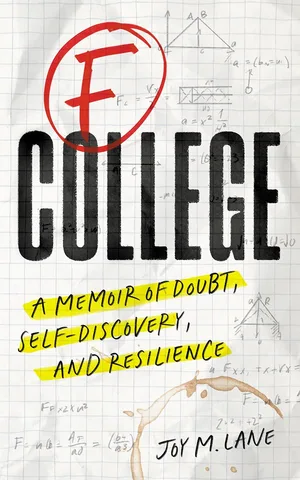
Joy is a Scribe Media author. Her result is strong, not typical, and nobody can promise it.
The 30-minute setup checklist
Do this once your request is approved. Times are a guide for one book.
| Minutes | Task | Done when |
|---|---|---|
| 0 to 3 | Bookmark the author dashboard | You can reach it in one click |
| 3 to 6 | Add the same photo you use on Amazon, LinkedIn and your website | One face everywhere |
| 6 to 14 | Paste your bio, written for your reader: who you help, what you have done that matters to them, where to find you next. Use the version from your Amazon author page | Bio and website link are live |
| 14 to 17 | Check your book listings: right title, subtitle, cover and editions. Request fixes for anything wrong through the Librarians Group | No wrong or duplicate editions left unreported |
| 17 to 23 | Turn on Ask the Author and answer two questions: why you wrote the book, and the question clients ask you most | Two published answers |
| 23 to 26 | Shelve five books that shaped your thinking, with a one-line review of one | Shelves show what you read |
| 26 to 28 | Add two exact lines from your book as quotes | Two quotes added, word for word |
| 28 to 30 | Add your Goodreads author link to your website and email signature, and decide yes or no on a giveaway | Link live; giveaway on your plan or crossed off |
Importing a blog or newsletter archive can wait for a later session; the author newsletter guide covers what to write.
After setup: how much time to give it
For a reader book, spend a little time each month: shelve what you read, answer new questions, and consider a second giveaway, which Goodreads' tips post suggests running a couple of months after the first. For a client book, check in after launch week and once a quarter.
Whatever the book, note the Want to Read and ratings counts on your book page at launch, then a month and three months later. If they barely move and no client ever mentions Goodreads, you have your answer. Lesson 10: what to measure has the full scorecard, and the one-page plan is where Goodreads gets its line, or does not.
Put Goodreads in its place on your calendar
Enter your launch date, the book's job and your weekly hours, and get a week-by-week plan with setup, giveaway and check-ins dated.